2020 年 10 月
在 2020 年 10 月,Brick Next (2.7.6) 及 Next Builder(1.30.2)发布的新特性包括:
自定义加工函数
在 Mirco App 编排时,经常需要进行数据加工,有时候需要编写数十行、甚至数百行的代码,无论是在求值表达式 <% ... %> 还是在 script-brick 中编写,都无法保障代码的可维护性、质量可靠性等基本要求,同时其复用成本也较高。Custom Processors 正是为了解决这个问题。
在 next-* 相关仓库中使用脚手架工具 yarn yo 并选择 a new custom processor 可以快速创建一个 Custom Processor。
初始化好的 Custom Processor 大约长这样:
// @file: next-*/bricks/your-package/src/custom-processors/modelsToGraph.ts
import { getRuntime } from "@next-core/brick-kit";

export function modelsToGraph(models: ModelData[]): Graph {
  // Some hard work.
}

// A camelCase of the package name namespace is auto generated to avoid name collisions.
getRuntime().registerProcessor("yourPackage.modelsToGraph", modelsToGraph);
编排时,可以在任意表达式中使用:
- brick: "your.any-brick"
  properties:
    someProp: "<% PROCESSORS.yourPackage.modelsToGraph(CTX.models) %>"
更多资料详见关于 Custom Processors 的文档。
深色主题和大屏模式
“Talk is cheap, show me the screenshot!”
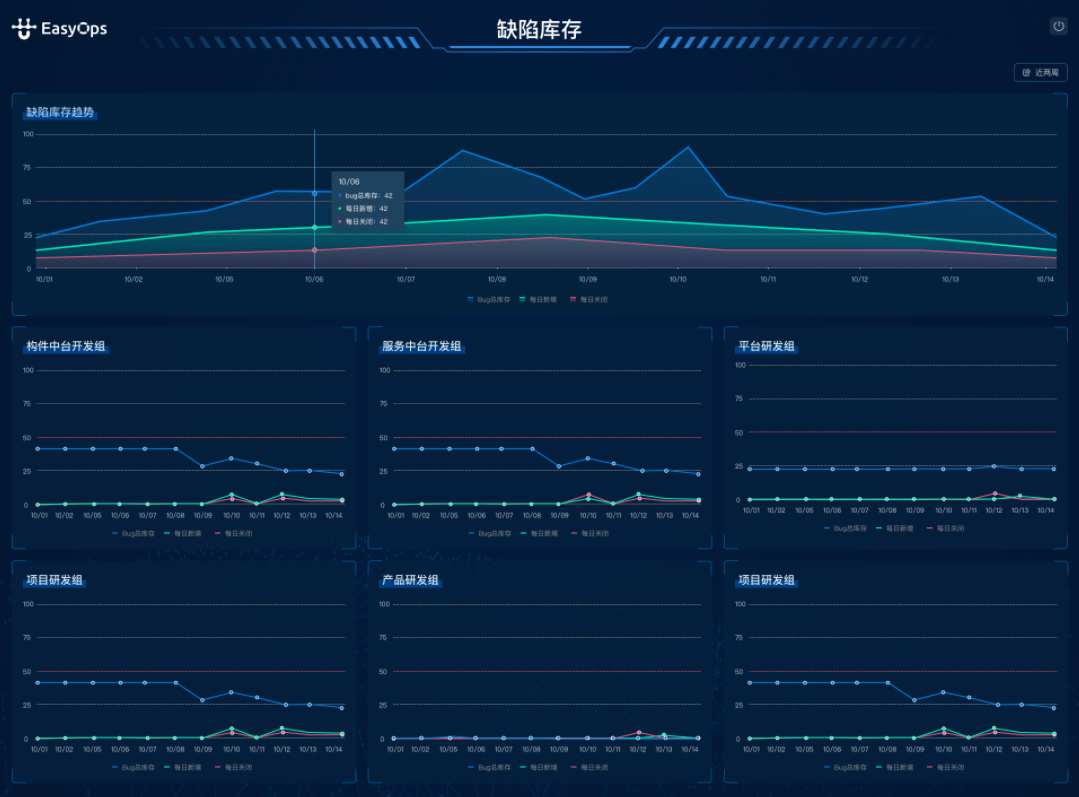
更多资料详见关于页面主题和模式的文档。
其它改进
应用名称本地化
现在可以为应用配置本地化名称了。对于在代码仓库中维护的应用:
app:
  name: "Halo"
  locales:
    en:
      name: "Hello"
    zh:
      name: "你好"
配置好后,在 Launchpad 及面包屑中显示的应用将自动使用本地化后的名称。如需在编排或构件代码中引用本地化后的应用名,可以使用 APP.localeName。
获取系统杂项配置
有时我们希望对系统进行一些运行时配置,对于开关类的配置我们有特性开关支持,但有时我们需要一些字符串或数字类型的配置,因此我们支持了新的获取杂项配置的编程接口。
类似于特性开关,在 api_gateway 中的 auth.bootstrap.sys_settings.misc 一节中,例如:
auth:
  bootstrap:
    sys_settings:
      misc:
        defaultTableColumns: 5
        webhookUrl: "http://localhost/"
在构件中,可以使用 Runtime 接口获取杂项配置:
import { getRuntime } from "@next-core/brick-kit";

const misc = getRuntime().getMiscSettings();
// {
//   defaultTableColumns: 5,
//   webhookUrl: "http://localhost/",
//   ...
// }
自定义模板支持多属性映射
有时候我们期望将模板的一个属性映射到多个不同的内部构件属性上,这时我们可以配置 extraOneWayRefs:
proxy:
  properties:
    pageName:
      ref: "micro-vew"
      refProperty: "pageTitle"
      extraOneWayRefs:
        - ref: "button"
          refProperty: "buttonName"
        - ref: "link"
          refProperty: "linkName"
更多资料详见关于自定义模板的文档。